

A good comment section turns a page into a place people come back to.
A bad one fills up with spam, slows your site down and makes you wish you had switched comments off years ago.
The tool you pick decides a lot of that. So I went through the comment systems people actually use in 2027, checked what each one costs today and noted who it suits. Prices change often, so treat them as a guide and check the vendor before you buy.
What a Comment System Does
A comment system is the piece of software that lets readers reply under your posts, product pages or videos. It shows the comments, stores them somewhere, keeps out spam and gives you tools to moderate.
Most of them fall into three groups.
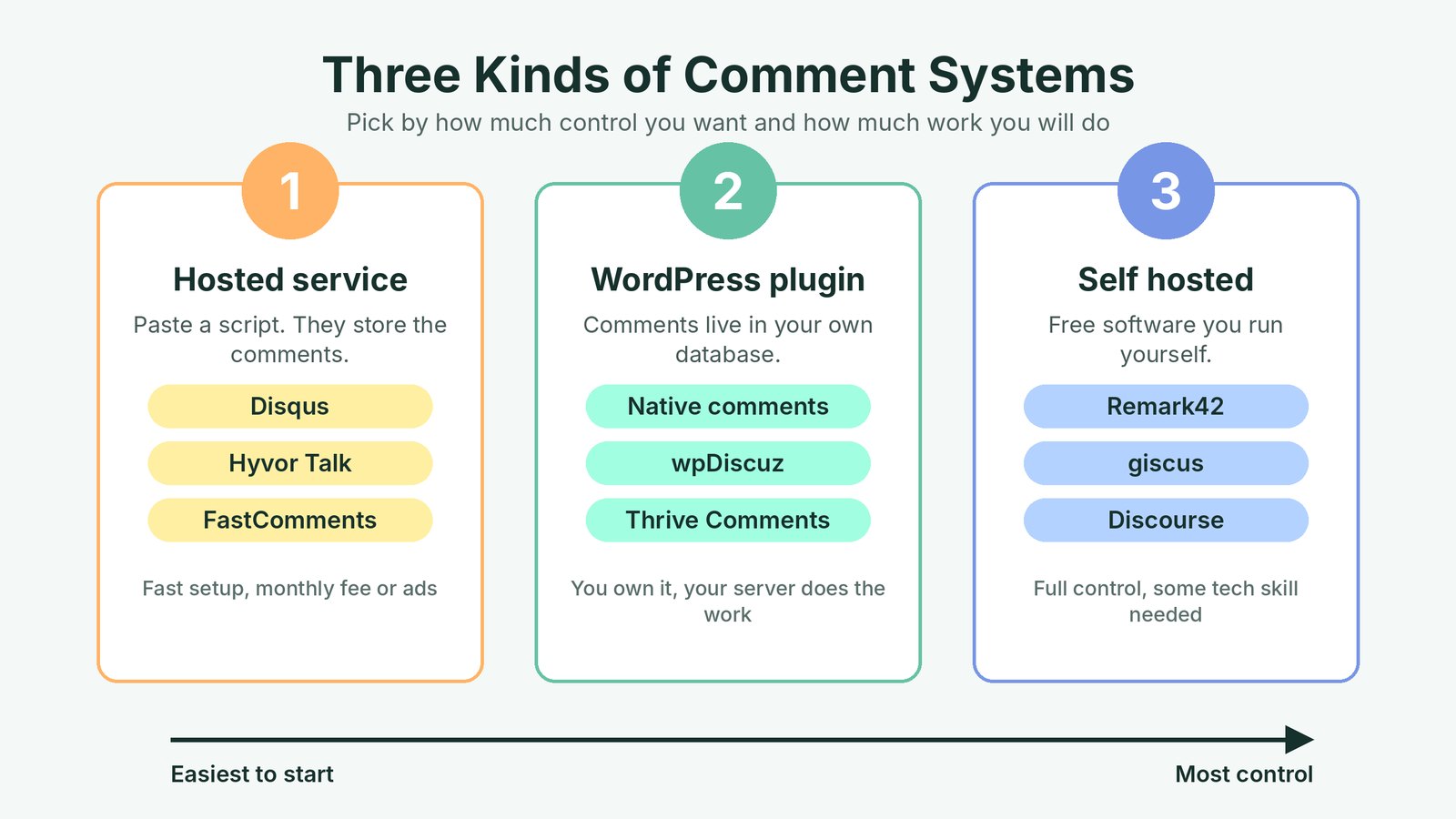
- Hosted services. You paste a small script and the company stores the comments on its servers. Easy to start and easy to leave running. Disqus, Hyvor Talk and FastComments work this way.
- WordPress plugins. The comments live in your own WordPress database. You own everything, but your server does the work. wpDiscuz and Thrive Comments sit here.
- Self hosted open source. Free software you run yourself, on your server or through GitHub. Remark42 and giscus are the popular picks.
None of these is better in every case. A personal blog, a busy news site and a developer docs site want very different things.
What to Look For Before You Choose
I'd look at five things, roughly in this order.
Speed
Comments should never slow your page. The best tools load late, after your content, and keep their script small. If a tool adds a second or more to your load time, your readers will feel it and so will your search rankings.
Spam protection
Spam is the reason most sites give up on comments. You want automatic filtering plus a simple queue where you can approve or delete in bulk. Built in filters are fine for small sites. Busy sites usually add Akismet or something similar.
Who owns the data
Can you export every comment in a standard format? Can you move to another tool without losing ten years of discussion? Check before you commit.
Privacy and ads
Some free plans pay for themselves with ads and tracking. That may be fine for you, or it may clash with your brand. Read what the free plan includes.
Ease for readers
Guest comments, social login, replies in threads and email alerts when someone answers. The fewer hoops a reader jumps through, the more comments you get.
The 10 Best Comment Systems in 2027
Here they are, with the price you will actually pay to get going.
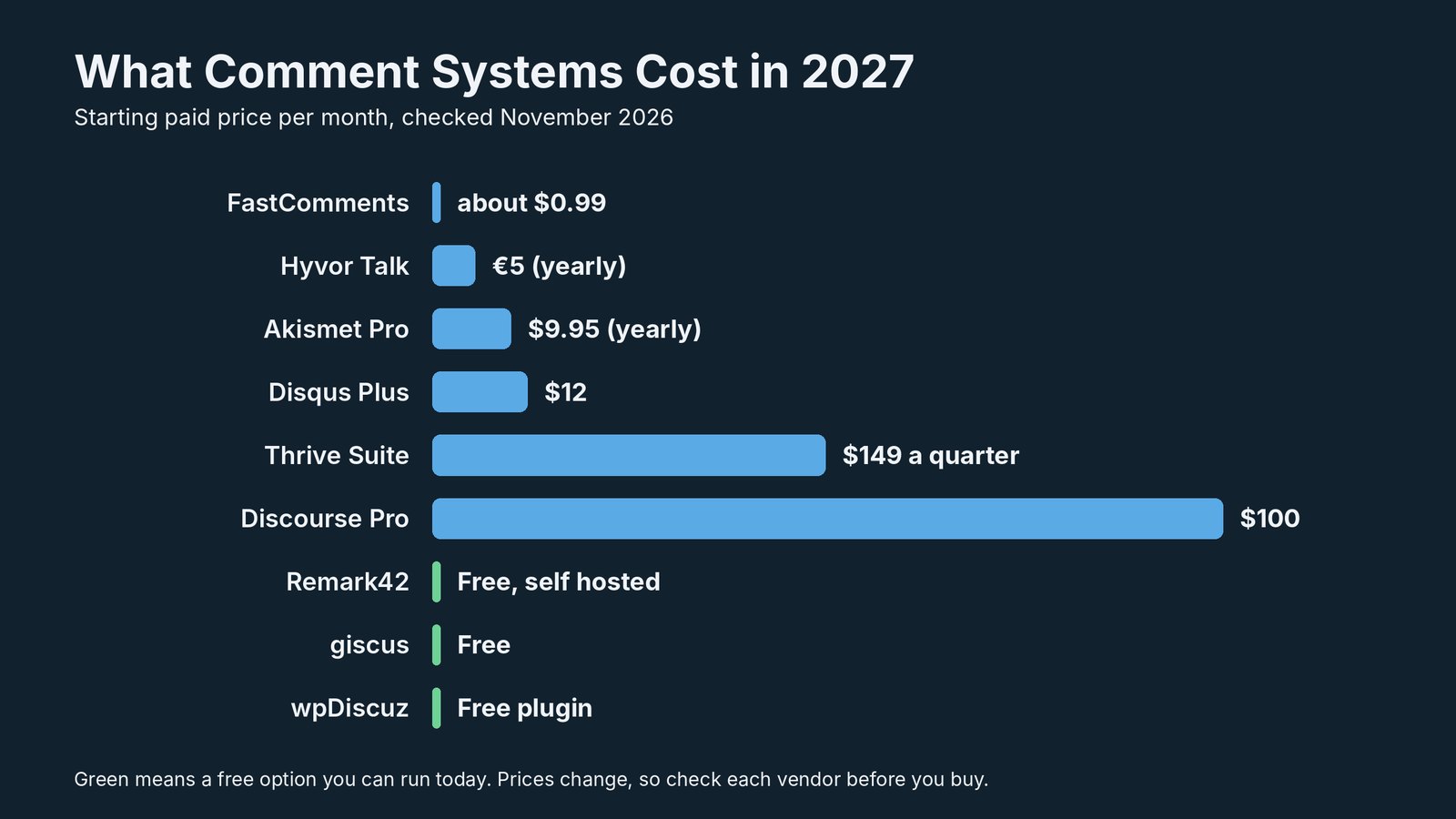
| Comment system | Type | Free option | Paid from | Best for |
|---|---|---|---|---|
| Disqus | Hosted | Yes, with ads | $12 a month | Blogs that want a big network |
| wpDiscuz | WordPress plugin | Yes | $120 addon bundle | WordPress sites |
| Hyvor Talk | Hosted | Trial | €5 a month, billed yearly | Privacy minded blogs |
| FastComments | Hosted | Trial | About $0.99 a month | Small sites on a budget |
| Native WordPress plus Akismet | Built in | Yes | $9.95 a month for business use | Simple WordPress blogs |
| Thrive Comments | WordPress plugin | No | $149 a quarter (suite) | Marketing sites on Thrive |
| Remark42 | Self hosted | Yes, open source | Free | Developers who want control |
| giscus | GitHub based | Yes | Free | Docs and tech blogs |
| Discourse | Forum plus comments | Yes, self hosted | $100 a month hosted | Full communities |
| Coral | Hosted or self hosted | Open source | Custom quote | News publishers |
1. Disqus
Disqus is still the name most people know. You drop in the code, and readers who already have a Disqus account can comment right away. It has solid moderation, badges for regulars and import and export tools.
The free Basic plan shows ads on your site, and the ads are not optional. To control them you need Plus, which is $12 a month or $132 a year for up to 100,000 monthly pageviews and three sites. Bigger sites move to Pro at $115 a month or $1,260 a year.
Good for blogs that want comments working in five minutes and don't mind the Disqus look.
2. wpDiscuz
If you run WordPress, wpDiscuz is the plugin most people switch to. It replaces the default comment form with a faster, nicer one that updates live, supports social login and lets readers comment on a single paragraph.
The plugin itself is free. Extras like a media uploader and advanced moderation come as addons, and the basic addon bundle is $120 for unlimited sites. Your comments stay in your own database, which I like.
3. Hyvor Talk
Hyvor Talk is a hosted system with no ads and no tracking. It also does reactions, star ratings and newsletters, which is handy if you want readers to leave a quick reaction instead of a full comment.
The Personal plan is €5 a month, billed at €50 a year. Premium is €12 a month and Business, with single sign on and webhooks, is €40 a month.
4. FastComments
FastComments charges by use instead of by plan, and its own pricing page says most sites pay about $0.99 a month. The widget is quick, it handles live updates and it imports from Disqus and WordPress.
There's a 30 day free trial with no card needed. A good pick if your blog gets modest traffic and you want a hosted tool that costs almost nothing.
5. Native WordPress Comments Plus Akismet
Don't skip the option you already have. WordPress comments are free, load fast and keep every word in your database.
Their weak spot is spam, which is where Akismet comes in. It's name your price for personal blogs. Commercial sites pay from $9.95 a month, billed yearly. For a lot of small business blogs this pair is all you need.
6. Thrive Comments
Thrive Comments is built for marketers. It adds upvotes, badges, featured comments and, the interesting part, actions after someone comments. You can show an offer, ask them to share or send them to another post.
You can only get it inside Thrive Suite, which lists at $149 a quarter or $599 a year. Worth it if you already use Thrive for your site. Expensive if you only want comments.
7. Remark42
Remark42 is free, open source and runs on your own server. It's light, it doesn't track readers and it supports social login, email alerts and Telegram notifications.
The catch is that you need to host it. If you're comfortable with Docker, it's one of the cleanest setups around.
8. giscus
giscus stores comments in GitHub Discussions. No database, no ads, no tracking, and it's free.
Readers need a GitHub account to comment, so it's perfect for developer blogs and docs and a poor fit for almost everyone else.
9. Discourse
Discourse is really a forum, but it can embed a discussion under each post. Every article gets a matching topic, and the conversation can keep going in the forum long after the post is old.
It's open source and free to run yourself. Hosted plans start at $100 a month for Pro and $500 a month for Business. Choose it when you want a real community around your posts, with threads that live on long after the article.
10. Coral
Coral comes from Vox Media and is used by news sites that get thousands of comments a day. It has strong moderation tools, including options that flag toxic comments for review.
The software is open source. The hosted version is priced by quote. Most small sites won't need it, but if you run a publication it's worth a look.
How to Pick the Right One
If you're still unsure, this simple path works for most sites.
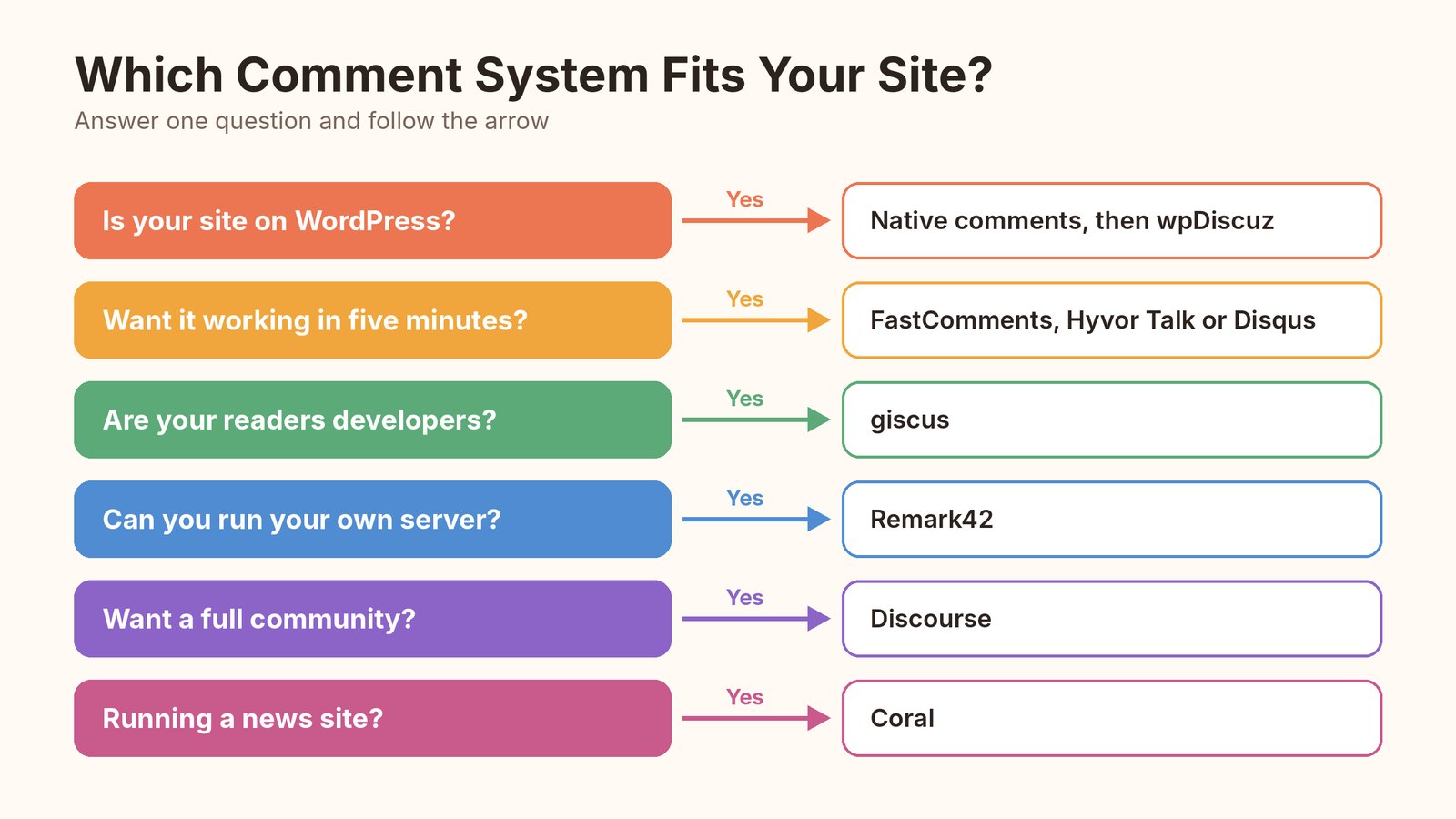
- On WordPress and want it simple? Start with native comments plus Akismet. Move to wpDiscuz when you want a nicer form.
- Not on WordPress and want something quick? FastComments or Hyvor Talk. Disqus if you don't mind ads or will pay for Plus.
- Developer audience? giscus.
- You want full control and can run a server? Remark42.
- You want a real community? Discourse.
- You run a newsroom? Coral.
Whatever you pick, test it on one busy post for a week before rolling it out. Look at load time, spam that gets through and how many people actually comment.
How to Keep a Comment Section Worth Reading
The tool is maybe a third of the job. The rest is how you run it.

- Post a short set of house rules. Two or three lines are enough. No spam, no personal attacks, stay on topic. Link them near the comment box.
- Reply early. The first few hours after a post goes live matter most. When you answer the first comments, more people join in.
- Ask a real question at the end of your post. Not "What do you think?" but something people can answer from their own experience.
- Hold first time comments for review. Most systems can do this. Once someone is approved, their next comments go through on their own.
- Feature the best comments. Pin a great answer or add it to the post. People notice, and they write better comments to get the same spot.
- Delete without arguing. Spam and abuse go. Don't debate trolls in public.
Do this for a few months and you'll have regulars who answer each other while you sleep.
Comments Happen Off Your Site Too
Here's the part most comment system guides skip.
Many of the conversations about your posts won't happen on your site at all. They'll happen when you share the post on LinkedIn, X or Facebook. People reply there, ask questions there and decide there whether to click through.
Replying to those comments, and joining other people's threads in your niche, is one of the best ways to bring new readers to your blog. It's also a lot of typing.
That's the job Engagi does. It's a Chrome extension, not a widget for your site. When you're on a social post, you click the Engagi button and it writes a thoughtful reply that fits the post, in your tone. You read it, change what you like and post.
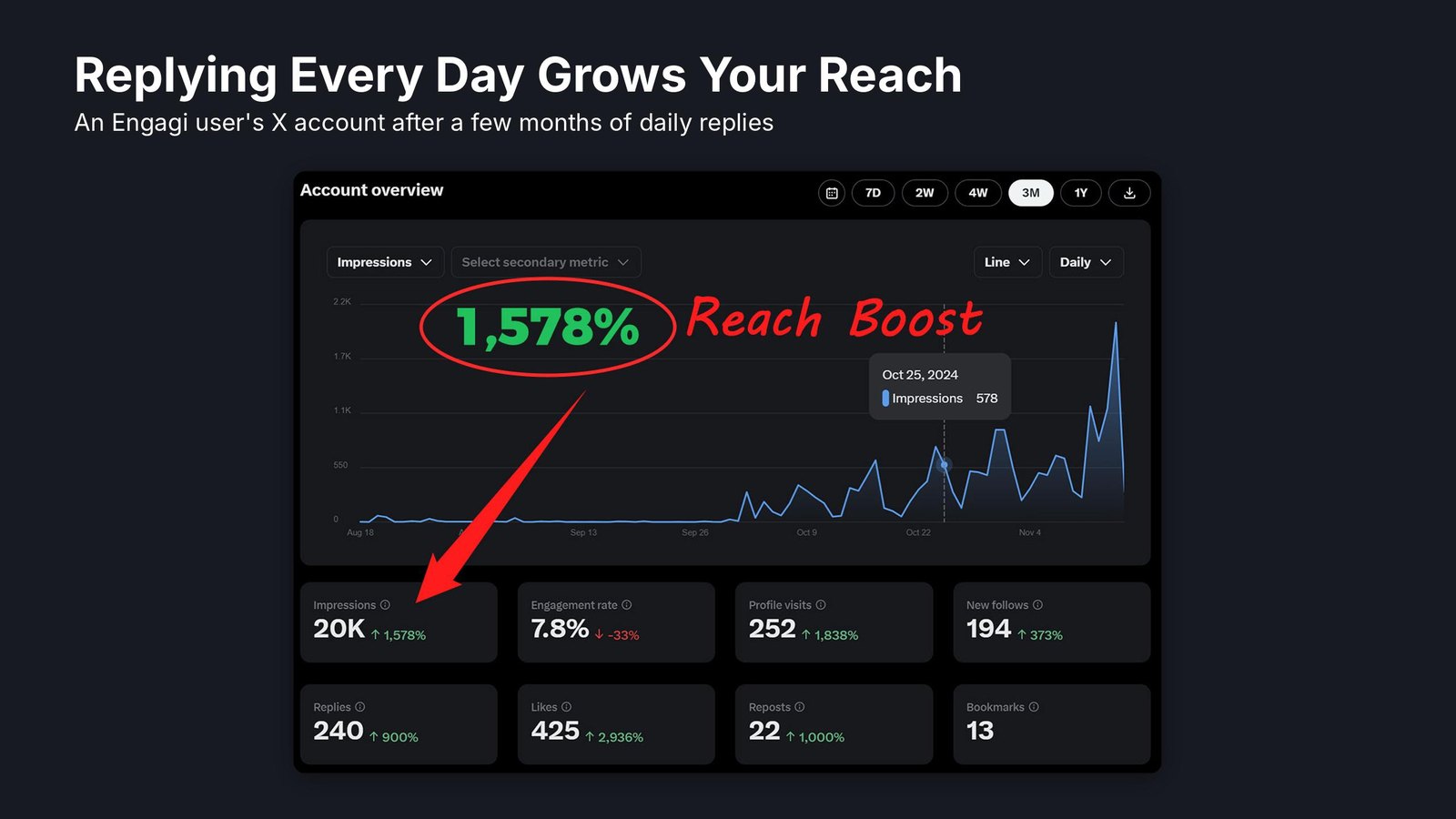
Engagi costs $5.58 a month, paid yearly ($67 a year), or $6.99 month to month, and it comes with a 30 day money back guarantee. If you'd like to see it in action, the short video below shows it working.
Use a comment system for the talk on your site. Use Engagi to join the talk everywhere else. Together they keep you in the conversation.
Frequently Asked Questions
Do comment systems help SEO?
They can. Good comments add fresh words to a page and keep readers around longer. Spam does the opposite, so moderation matters more than the tool. Systems that load comments with a script may not have every comment seen by search engines, while native and plugin based comments are part of the page.
Will a comment system slow my site down?
Some do. Hosted systems add an outside script, and plugins add work for your server. Pick one that loads after your content, and test your page speed before and after you install it.
What is the best free comment system?
For WordPress, native comments with Akismet or the free wpDiscuz plugin. For other sites, Remark42 if you can host it and giscus if your readers are on GitHub. Disqus Basic is free too, but it shows ads.
Can I move my comments from one system to another?
Usually yes. Disqus, wpDiscuz, FastComments and most others can export or import comments. Check the export format before you sign up so you're never stuck.
Should I turn comments off instead?
Some sites do, and it's a fair choice if you can't moderate. But you lose a lot. Comments tell you what readers are confused about, which often gives you your next post idea. If time is the problem, hold all comments for review and approve them once a day.
Is Engagi a comment system for my website?
No. Engagi is a Chrome extension that helps you write replies and comments on social networks like LinkedIn, X and Facebook. Use it alongside whichever comment system you choose for your site.